


-

 Orders & Payments
-
Placing Orders
Placing OrdersHow do I check the balance on my Gift Card or eVoucher?
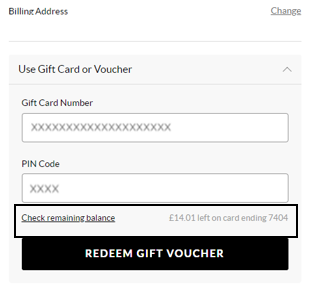
To view your balance on a Gift card or eVoucher you will need to add your items to the basket first and then once you've selected your delivery option you will be taken to the payment section. You will be presented with all the payment options available for your order. Select ‘Use Gift Card or eVoucher’ and enter your eVoucher/credit note code and pin number and then select ‘Check remaining balance’, you will then be able to see your balance.
Vai šis raksts bija noderīgs? Jā Nē
Send feedbackPaldies par atsauksmi. Tomēr šī konkrētā veidlapa netiks nosūtīta klientu apkalpošanas dienestam, un mēs nevarēsim atbildēt uz jautājumiem, kas šeit uzdoti.
Ja jums ir nepieciešama klientu apkalpošanas dienesta palīdzība, lūdzu, nospiediet pogu “Sazināties ar mums”.
-
Placing Orders